
Deleted means gone. For good.
When Windows deletes a file, the content stays on the disk until something writes over it, and any recovery tool can bring it back. ChronoSafeDelete writes over every byte first, several times, checks that the disk really took it, scrambles the name, and only then deletes it.
Pick files and folders, find them by type (every PDF in a folder, old Office files, temporary files), or wipe the free space of a drive so what was deleted before cannot come back either. Every cleanup leaves an erasure report in your account.
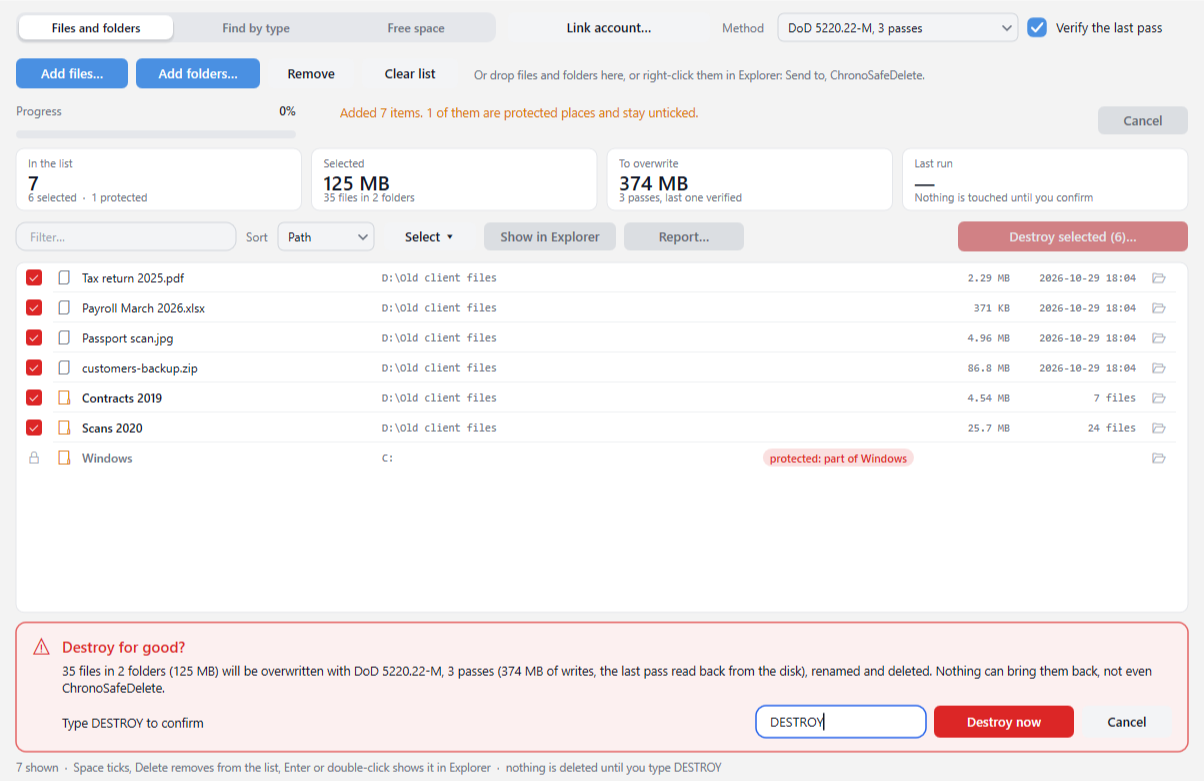
What happens to each file
Overwritten in place
Every byte, pass after pass: zeros, ones, fixed patterns or ChaCha20 random data, each pass flushed to the disk before the next one. The slack after the end of the file and its hidden streams (where Windows keeps "downloaded from the Internet" marks, and where anything can hide) go too.
Read back
The last pass is read again straight from the disk, bypassing the cache, and compared byte by byte. A file that did not take the overwrite is reported, not deleted.
Name and dates scrambled
The file is cut to zero bytes, its dates set to 2000-01-01, and it is renamed several times to random names of the same length, so the folder index forgets what it was called.
Then deleted
Folders go after everything in them, renamed and removed the same way. A link (a shortcut folder, a symbolic link) is removed as a link: what it points to is never touched.
Three ways in
Files and folders
Add them, drop them on the window, or right-click them in Explorer (Send to, ChronoSafeDelete). Folders show their size and file count before you decide.
Find by type
A folder and the types (pdf, docx, ~$*, or a preset: Office documents, scans, videos, archives, temporary files), with minimum size and "older than" filters. You see every file found and untick what to keep.
Free space
Fills the empty part of a drive with random data and gives it back, plus small files over the free records of the NTFS master file table. What was deleted the normal way before can no longer be recovered.
Safe by design
Nothing happens until you type DESTROY. Windows, installed programs and folders Windows needs (your profile, Documents itself) cannot be picked; files in use are left alone and reported.
Erasure reports
Every run can be saved to your account with a title ("Paul's PC cleanup"): the method, the counts, the drives, the time, and the file names only if you want them. View, print or download them from any browser.
A console twin
ChronoSafeDeleteCli runs the same engine from scripts: a dry run by default, --yes to do it, --save-report "Title" to keep the report in your account.
Your erasure reports
The reports your PCs saved after each cleanup. Link ChronoSafeDelete to your account (Link account, top of the window) and press Save to Miniserver after a run, or use --save-report from the console.
What no file wipe can reach
ChronoSafeDelete overwrites what Windows can reach. Be honest with yourself about the other copies:
- SSDs move data around inside (wear levelling): the drive's controller may keep old copies of blocks that Windows cannot address. Overwriting still removes what any software can read; wipe the drive's free space afterwards so the freed blocks are erased too (TRIM). For a whole SSD you are giving away, use the maker's Secure Erase.
- ReFS volumes and files compressed by Windows write changes to new places; the app tells you, and a free-space wipe covers what was left.
- Other copies: Windows restore points and shadow copies, backups (File History, ChronoBackup, a NAS), OneDrive and its version history and online recycle bin, e-mail attachments, copies on other disks.
Download
ChronoSafeDelete is free, no account needed to install or use it. A free Miniserver account is only where your erasure reports are kept, if you want them kept.
One installer for every ChronoScan tool: open it and press Install on ChronoSafeDelete. ChronoScan Tools also tells you when a new version is out.
Questions
How many passes do I need?
One pass of random data is enough for any drive made this century; that is what NIST SP 800-88 asks. The default, DoD 5220.22-M with 3 passes, is the classic standard many policies name. Gutmann's 35 passes were designed for 1990s disk encodings and only take longer.
Can I get a file back afterwards?
No. That is the point: not from the Recycle Bin (it does not go there), not with recovery tools, not with ChronoSafeDelete. Copies elsewhere (backups, OneDrive, restore points) are not touched.
What is in a report?
Its title, the computer and user, when it ran and for how long, the method and passes, whether the last pass was verified, how many files were destroyed, verified, failed or skipped, the bytes, the drives (SSD or HDD, file system) and the caveats that apply. File names only if you tick List the file names: a list of what was destroyed can itself say too much.
Who can see my reports?
Only your account. They are stored like every other app's data on this Miniserver, readable by you and by the PCs you linked. You can delete them here.
A file says "in use by another program".
Close the program that has it open (or restart Windows) and run it again. ChronoSafeDelete never forces an open file: it would only overwrite part of it.
Does the free-space wipe touch my files?
No. It creates temporary files that fill the empty space, writes them, and deletes them; Windows deletes them by itself even if the app is closed half way. While it runs the drive is full, so other programs writing to it may complain.
Which Windows?
Windows 10 or 11, 64-bit. The setup and the executables are signed by CHRONOSCAN CAPTURE S.L.